


Size Finder Measurement Guide & Usage Information
Mobile Phone EMF Protect Filter:
- Format: Ultra-thin adhesive filters (Pack of 2 rectangular holograms).
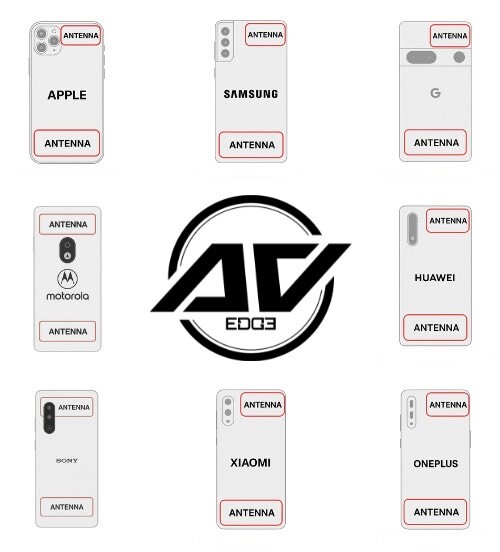
- Placement: Applied directly to your phone's chassis on top of the aerial/Wi-Fi antenna so the signal passes through the protect filter to potentially modulate the signal, underneath your standard case.
- Visual Guide: Modern 4G/5G mobile phones often split their antenna transceivers across the top and bottom frame edges. Our current 2 x small rectangular setup allows users to place one at the top and one at the bottom. Our visual guide gives the suggested location on various mobile phones. Guide for illustrative purposes only; antenna locations vary significantly between models, it is the user's responsibility to identify the specific aerial/antenna location/s for their device.
- Wear, Tear & Case Protection: Everyday friction from taking your phone in and out of pockets or bags etc. will naturally cause adhesive stickers to deteriorate over time. Physical wear and tear from general daily use is not covered under warranty. To protect your filters from physical damage and surface peeling, we strongly recommend placing a standard protective mobile phone case or shell over your device once the filters are applied.
- Experience: Wellbeing support may take at least 4 weeks. Results aren't guaranteed.
- Replacement Cycle: For optimal performance, replace both filters every 12 months. Check EF Technology Discs.
Laptop/Tablet EMF Protect Filter:
- Format: Ultra-thin adhesive filter (Pack of 1 circular hologram).
- Placement: Locations vary significantly between models, it is the user's responsibility to identify the specific location/s for their device.
- Tablet Placement: We suggest placement on the centre back.
- Laptop Placement: Many modern laptops utilise dual Wi-Fi/Bluetooth antenna transceivers in the top-left and top-right corners of the display lid, while the main processing board and Wi-Fi card reside in the bottom chassis. Given these multiple emission zones, we suggest placing 1 x circular hologram on the lid.; however, if you often use the laptop on your lap then we suggest buying a second pack to place another circular hologram on the bottom base.
- Wear, Tear & Case/Sleeve Protection: Everyday friction from sliding your laptop or tablet in and out of bags, sleeves, or cases will naturally cause adhesive stickers to deteriorate over time. Physical wear and tear from general daily use is not covered under warranty. To protect your filters from physical damage and surface peeling, we strongly recommend placing a protective shell or sleeve over your device once the filters are applied, or placing the filter on an area of the chassis that does not suffer from direct, constant surface friction.
- Experience: Wellbeing support may take at least 4 weeks. Results aren't guaranteed.
- Replacement Cycle: For optimal performance, replace every 12 months. Check EF Technology Discs.
Need help? Chat with us online - we're here to help!